
How to Claim Staff or Change Evaluation Methods in Strive
This guide explains how Evaluators can "claim" a staff member or update their evaluation method (Appraisee Type). Please follow the steps below if you need to:
Assign an evaluation method to establish the framework for goal setting.
Claim a staff member who was previously evaluated by another user to assign yourself as their appraiser.

Important Note on Claiming Staff: Strive does not have a specific button labeled "Claim." To assign yourself as the Appraiser for a staff member, you must follow the process below. Clicking "Save" automatically lists you as the Appraiser, even if you do not change the evaluation method.
Instructions
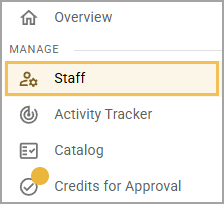
1. Navigate to Staff Management
Under Manage from the main menu, select Staff.
2. Open the Actions Menu
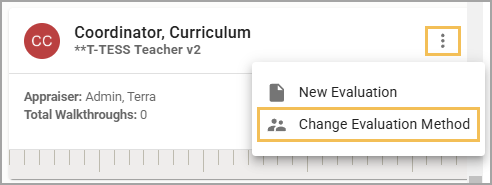
Locate the specific staff member's card. Select the Three Vertical Dots icon to open the More Actions menu, then select Change Evaluation Method.
3. Review Appraisal Details
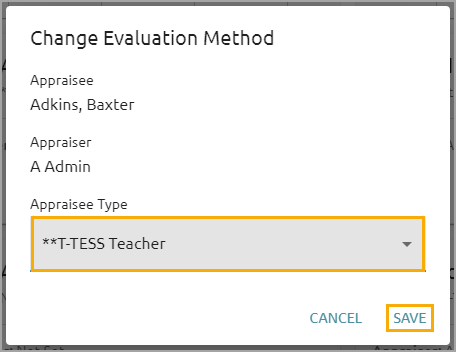
The system will display a window confirming the Appraisee (Staff Member) and the Appraiser (You). To proceed, please review the Appraisee Type drop-down menu:
To Change the Method: Select the correct framework (e.g., T-TESS, Professional) from the list.
To Claim the Staff Member Only: If the current method is correct, you do not need to make changes.
4. Save to Confirm Assignment
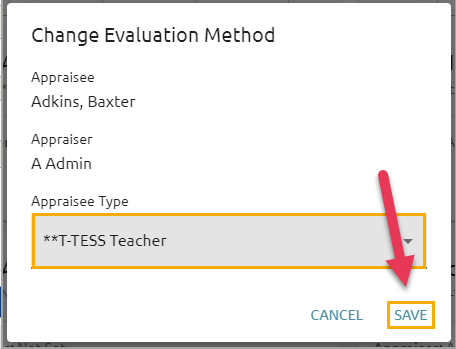
Select Save.
This action assigns you as the designated appraiser for this staff member and applies the selected evaluation method.
Still have questions? Visit the Additional Help section for further assistance.