
If you cannot find the Security Settings or Recovery options as well as missing applications in your ClassLink SSO menu, your profile view may be set incorrectly. You will need to switch your profile from "Group" to "Staff" to see these options.
Instructions for Switching Your Profile
1. Check Your Current Profile
-
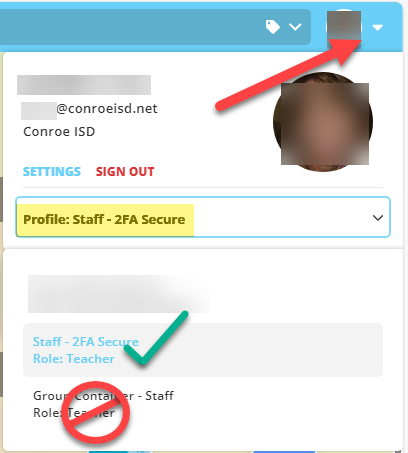
Open the menu in the upper right corner of your SSO home page.
-
Look at the text under your name.
-
If it says Group, you are in the wrong view. (Note: It should say Staff-2FA Secure).
2. Change to Staff View
-
Select the word Profile (or the text "Group") in the menu.
-
Select Staff-2FA Secure from the list.
3. Verify the Change
-
Your screen and apps will reload automatically.
-
Once it reloads, open the menu again. You should now see the Security options available.
Need additional help? Click here for further assistance.