Conroe ISD Knowledge Base

How To Access Attendance Summary

1. After Logging into Home Access Center, click "District Applications"

https://ajeuwbhvhr.cloudimg.io/colony-recorder.s3.amazonaws.com/files/2025-04-28/5ea34093-d692-4931-8434-68411fb48c5c/user_cropped_screenshot.webp?tl_px=0,0&br_px=1376,769&force_format=jpeg&q=100&width=1120.0&wat=1&wat_opacity=0.7&wat_gravity=northwest&wat_url=https://colony-recorder.s3.us-west-1.amazonaws.com/images/watermarks/FB923C_standard.png&wat_pad=282,184

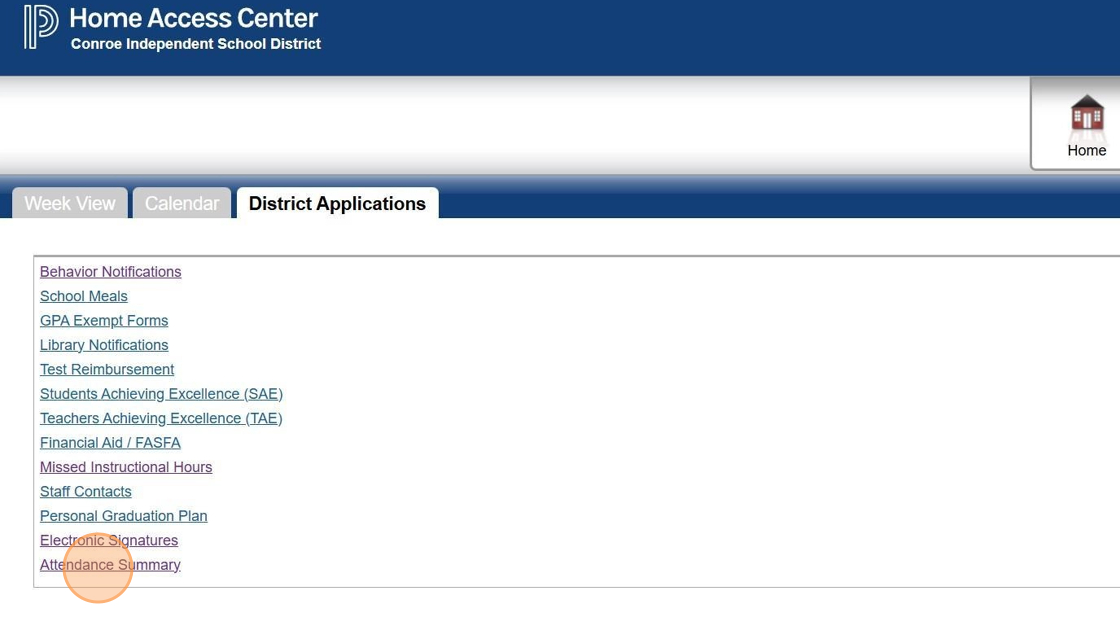
2. Click "Attendance Summary"

https://ajeuwbhvhr.cloudimg.io/colony-recorder.s3.amazonaws.com/files/2025-04-28/660209e0-3b9c-4cd4-8aab-3c76375a2769/user_cropped_screenshot.webp?tl_px=0,27&br_px=1376,796&force_format=jpeg&q=100&width=1120.0&wat=1&wat_opacity=0.7&wat_gravity=northwest&wat_url=https://colony-recorder.s3.us-west-1.amazonaws.com/images/watermarks/FB923C_standard.png&wat_pad=62,532

3. The Attendance Summary page will launch

https://ajeuwbhvhr.cloudimg.io/colony-recorder.s3.amazonaws.com/files/2025-04-28/7de3961b-d76d-4b31-83fa-356148e9aacd/user_cropped_screenshot.webp?tl_px=0,0&br_px=3828,1920&force_format=jpeg&q=100&width=1120.0