
This guide explains how to check which version of the operating system (iOS) is currently running on an iPad.
Why is this important? Knowing the iOS version helps determine if the device is up to date or if it meets the requirements to run specific apps.
If your device is on an older version, some apps may not function correctly. You should check for updates immediately after verifying the version.
Steps to Verify iOS Version
-
Locate and tap the Settings app (gear icon) on the home screen.
-
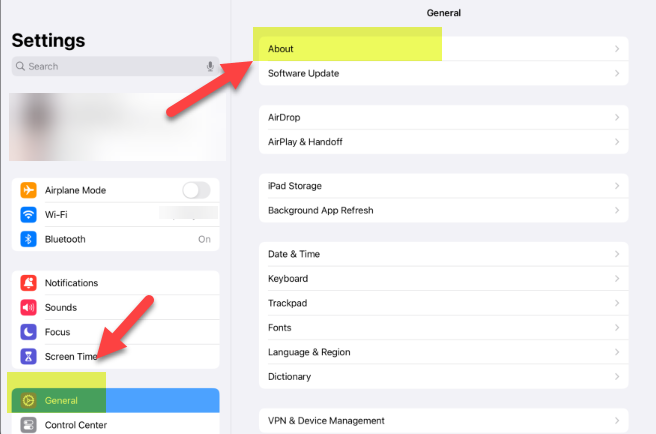
Select General from the left-hand menu, then tap About.
-
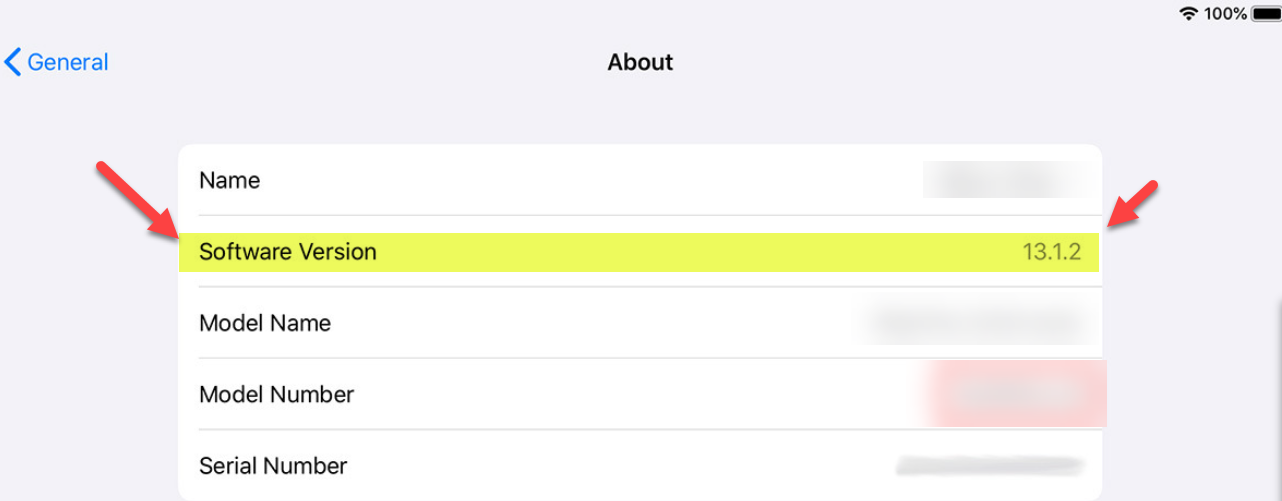
Look for the row labeled Software Version.
-
The number listed next to it (e.g., 15.4, 16.2) is your current iOS version.
Next Steps
If the version number is lower than the current standard, the device likely needs an update.
-
Please refer to the How to Update an iPad guide.
Need additional help? Click here for further assistance.