
The Asset tag (formerly known as the TipWeb tag) is the official asset tracking label assigned by Conroe ISD. It is used to identify your specific device for inventory and technical support.
-
Format: The tag number typically starts with the letter "T".
-
Look for: A white sticker featuring a barcode and the ID number.
Where to Find It
-
Turn your iPad over so the bottom is facing up.
-
Look for the white barcode sticker.
-
The alphanumeric code starting with "T" is your Asset tag.
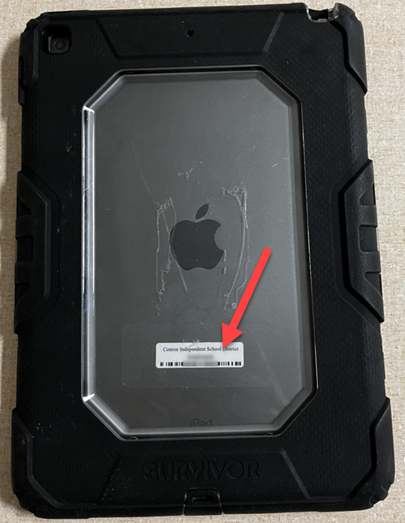
Missing or Unreadable Tag? If your iPad does not have a sticker, or if it is too damaged to read, you cannot look up the previous tag number yourself. You must request a new one immediately to keep your device compliant.
Steps to Fix:
-
Submit a Ticket: Open Incident IQ from your SSO
-
Action: Submit a request for the device and in the detail box input "New TIPWeb Tag."
-
Required Info: You must provide the Serial Number of the iPad in the ticket description.You can find out how to find the Serial Number by using these instructions: How to Find the Model Number of an iPad
-
Support: You may also contact your Campus Tech to assist with printing a replacement.
Need additional help? Click here for further assistance.